
Many people believe that Microsoft backs up everything in Microsoft 365. Microsoft makes sure that the service works and that data does not disappear because of a fault in its data centres. However, you are responsible yourselves for being able to restore data that someone deletes by mistake, that ransomware encrypts or that an attacker destroys with a hijacked account. Therefore, most organisations need their own Microsoft 365 backup.
In this article, we explain what the basic protection lacks and how we build a solution that holds up when it matters.
What Microsoft 365 protects and what it does not protect
Microsoft 365 has, for example, recycle bins, version history and retention policies. They help when a user deletes a file by mistake. However, they have limitations.
- Microsoft empties the recycle bin after a certain time
- An attacker with administrator rights can change or remove retention policies
- Ransomware that encrypts files in OneDrive creates new versions that push out the old ones
- Restoring a whole SharePoint site or many mailboxes takes a long time
In other words, the basic protection is good for everyday mistakes, but not for a real attack.
How we build Microsoft 365 backup
Choose a solution
Since 2024, Microsoft has offered the Microsoft 365 Backup service, which takes copies of Exchange, OneDrive and SharePoint within Microsoft’s environment. In addition, there are solutions from other suppliers, for example Veeam, AvePoint and Keepit, which store the copies outside Microsoft.
Therefore, we choose the solution based on your requirements, and we always compare several alternatives. Sometimes fast restore matters most. In other cases, it carries more weight that the copies sit with another supplier or in Sweden.
What Microsoft 365 backup should cover
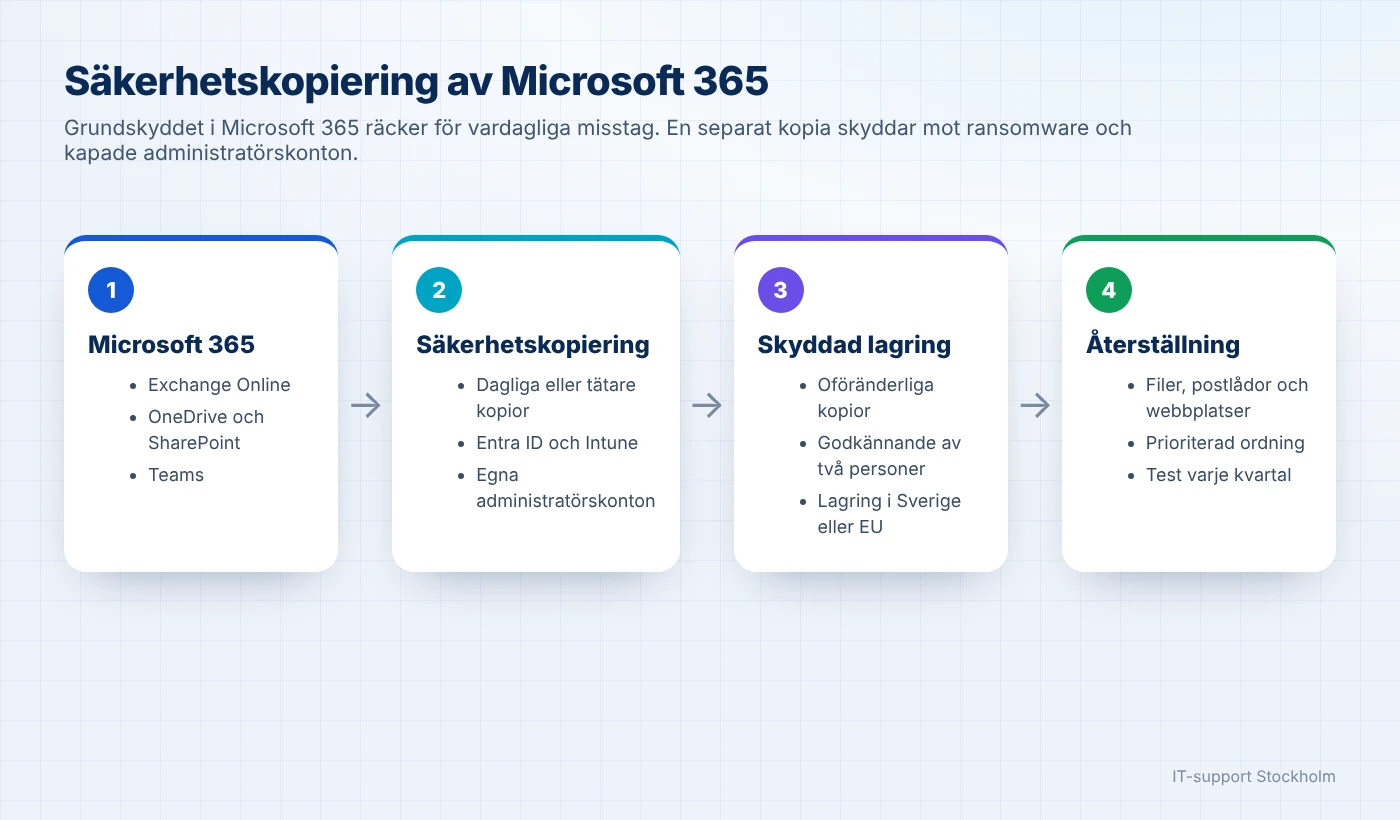
Next, we decide what the solution should cover. Usually, this means all mailboxes, OneDrive, SharePoint and Teams. Moreover, we back up the configuration in Entra ID and Intune, so that we can recreate policies and settings after an attack.
Protection for the copies in Microsoft 365 backup
Attackers also often try to delete the backups before they encrypt. Therefore, we protect the copies with immutable storage, separate administrator accounts and a requirement for approval from two people before anyone can delete anything.
Restores that work
A backup is only worth something if you can restore it. For this reason, we test restores regularly, both of individual files and of whole mailboxes and sites.
At the same time, we document the order in which we restore after a major attack. For example, the mailboxes of management and the finance department often come first.

Laws, agreements and retention periods
Many organisations must keep information for a certain time. This applies, for example, to accounting, contracts and cases at public authorities. At the same time, the General Data Protection Regulation requires that you do not keep information longer than necessary.
Therefore, we set retention periods that follow both the law and your own routines. In addition, we make sure that you can delete information about a person when required, even in the backups.
Responsibility and routines
Technology is not enough here either. Therefore, we appoint a person responsible for the backups and document who may start a restore. Furthermore, we check every week that all copies have succeeded, so that a fault never continues for several months.
You can also read about ransomware protection and about disaster recovery in the cloud.
Microsoft describes its own service in the documentation on Microsoft Learn.
Why groups choose us for Microsoft 365 backup
We have restored data after real intrusions and know what works when it matters. As a result, we build solutions that you can rely on, and we test them before you need them.
Our prices start at €400 per hour excluding VAT. In addition, we offer a fixed price for a complete introduction with a restore test. Contact us via the form on our home page.
Frequently asked questions about Microsoft 365 backup
The need
- Doesn’t Microsoft back up everything?
- What is shared responsibility in the cloud?
- Are the recycle bin and version history enough?
- What are retention policies?
- Can an attacker delete our retention policies?
- How does ransomware affect files in OneDrive?
- Do we need to back up Teams?
- Do we need to back up Entra ID and Intune?
- How long should we keep the copies?
- Can we delete information about a person in the copies?
Solutions
- What is Microsoft 365 Backup?
- Which other solutions exist?
- Where do the copies sit?
- Can the copies stay in Sweden?
- What is immutable storage?
- How do you protect the copies against attackers?
- How quickly can you restore a mailbox?
- Can we restore a whole SharePoint site?
- How often do you take the copies?
- Does the backup affect users?
Price and cooperation
- How often do you test restores?
- Do you help us during an attack?
- Do you work with our current supplier?
- Do you document the solution?
- What does backup cost per user?
- What does an introduction cost?
- Do you offer a fixed price?
- Can you monitor the copies continuously?
- Do you also help public authorities and law firms?
- How do we get started?